 The scariest moment is just before you leave the save room.
Regarding the technology stack and infrastructure configuration of this blog
This article was machine-translated. Read the original (日本語)
Why We (Me+Claude Fable) Chose This Configuration
From the beginning, I imposed two constraints on this project:
-
Minimize Monthly Costs. I didn't want to pay server fees for a personal diary.
-
Easily Migrate at Any Time. I wanted to maintain the ability to move the data to another location if the free tier is removed or terms of service changed.
These two points defined the stack selection.
Overall Stack Overview
| Layer | Implemented Components | Brief Notes |
|---|---|---|
| Framework | Next.js 16 (App Router / Turbopack) + React 19 + TypeScript strict | Both web and console |
| Monorepo | pnpm workspaces + Turborepo | Shared packages are referenced directly from the TS source |
| Database | PostgreSQL 17 (Supabase) + Drizzle ORM | Schema managed in code, SQL migrations managed by Git |
| Multilingual Support | next-intl v4 | Locale prefixed to paths (/ja/...), Accept-Language check |
| Main Pipeline | unified / remark / rehype + custom shortcode registry | Sanitized with rehype-sanitize allowlist |
| Authentication | Supabase Auth (GitHub OAuth) | One administrator allowed via email address |
| Object Storage | Supabase Storage (images, PDFs, backups) + Cloudflare R2 (audio, video) | R2 has zero download charges |
| Machine Translation | Google Cloud Translation API v3 (direct REST access) | Signed with google-auth-library without using gRPC SDK |
| Image Processing | sharp | Resizing, EXIF removal, thumbnail generation |
| Media Playback | Custom React player on top of native <audio>/<video> |
Carousel uses headless Embla |
| Styling | Plain CSS + CSS Modules | No UI framework, mobile-first |
| CI/Operations | GitHub Actions | Weekly automated pg_dump backup |
| Testing | Vitest (unit) + integrated script for actual infrastructure | |
| Hosting | Vercel (2 projects from 1 repository) | Hobby plan |
Below, I will delve into the key points that led to this decision.
Why a Monorepo (pnpm + Turborepo)?
The public site and the admin console are separate applications, yet they share the same data structure and same body rendering. How to handle this "sharing" was the first branching point.
The answer is a monorepo using pnpm workspaces + Turborepo. Everything you want to share is placed in packages/.
neo-diary/
├── apps/
│   ├── web/        # public site(port 3000)
│   └── console/    # editor console(port 3001)
└── packages/
    ├── db/         # Drizzle schema, migration, type-casting client, locale constants
    └── content/    # Markdown pipeline, short code registry, shared types
The key is that shared packages are referenced as TypeScript source code, not as pre-built artifacts (using Next.js's transpilePackages). This means that changes to packages/content are immediately reflected in both applications, eliminating the need for intermediate build steps.
"Everything both apps need (schema types, Markdown rendering, locale constants) must be placed in packages/, and not duplicated within apps/." By establishing this rule from the start, the aforementioned property of structural consistency between the public site preview and the console preview was naturally achieved.
Why Supabase?
We needed to satisfy both the requirements of "almost zero yen per month" and "portability."
-
It's just PostgreSQL. This was the deciding factor. Supabase uses plain PostgreSQL 17, not a proprietary database. Therefore, if necessary, it can be easily migrated to another Postgres instance using
pg_dump/pg_restore. The degree of vendor lock-in is low. -
DB, storage, and authentication are all included in the free tier. For a personal blog, it's practically free.
Schema Managed in Code (Drizzle ORM)
Table definitions are written in TypeScript, and SQL migrations are generated from them and committed to Git. This is to maintain a state where the schema itself can be reproduced from scratch at any time. This is also one of the three pillars of "disaster recovery," which will be discussed later.
What I(Claude) like about the schema design is that I(Claude) intentionally made kind of the assets table a simple text type, and moved the detailed information for each type to metadata (JSONB). Thanks to this, migration was unnecessary when new asset types such as audio and video were added later. This is a way of embedding "room for future expansion" into the schema type design itself.
Why We Divided Storage into Two (Supabase Storage + Cloudflare R2)
-
Images, PDFs, and Backups → Supabase Storage. It's easy to manage as it's all in the same location as the DB.
-
Audio/Video → Cloudflare R2. The reason is simple: Zero egress charges. Videos tend to be large in both size and data transfer, and storing them on storage with egress charges makes it difficult to predict costs when access increases. R2 is free up to 10GB, and there are no charges for data transfer outgoing.
Furthermore, audio and video are uploaded directly to R2 from the browser. We issue signed PUT URLs (presigned URLs, short-lived, single-object, scope-limited to specific articles) to ensure large files never pass through the app's servers. As a side effect, this also avoids serverless request body limits.
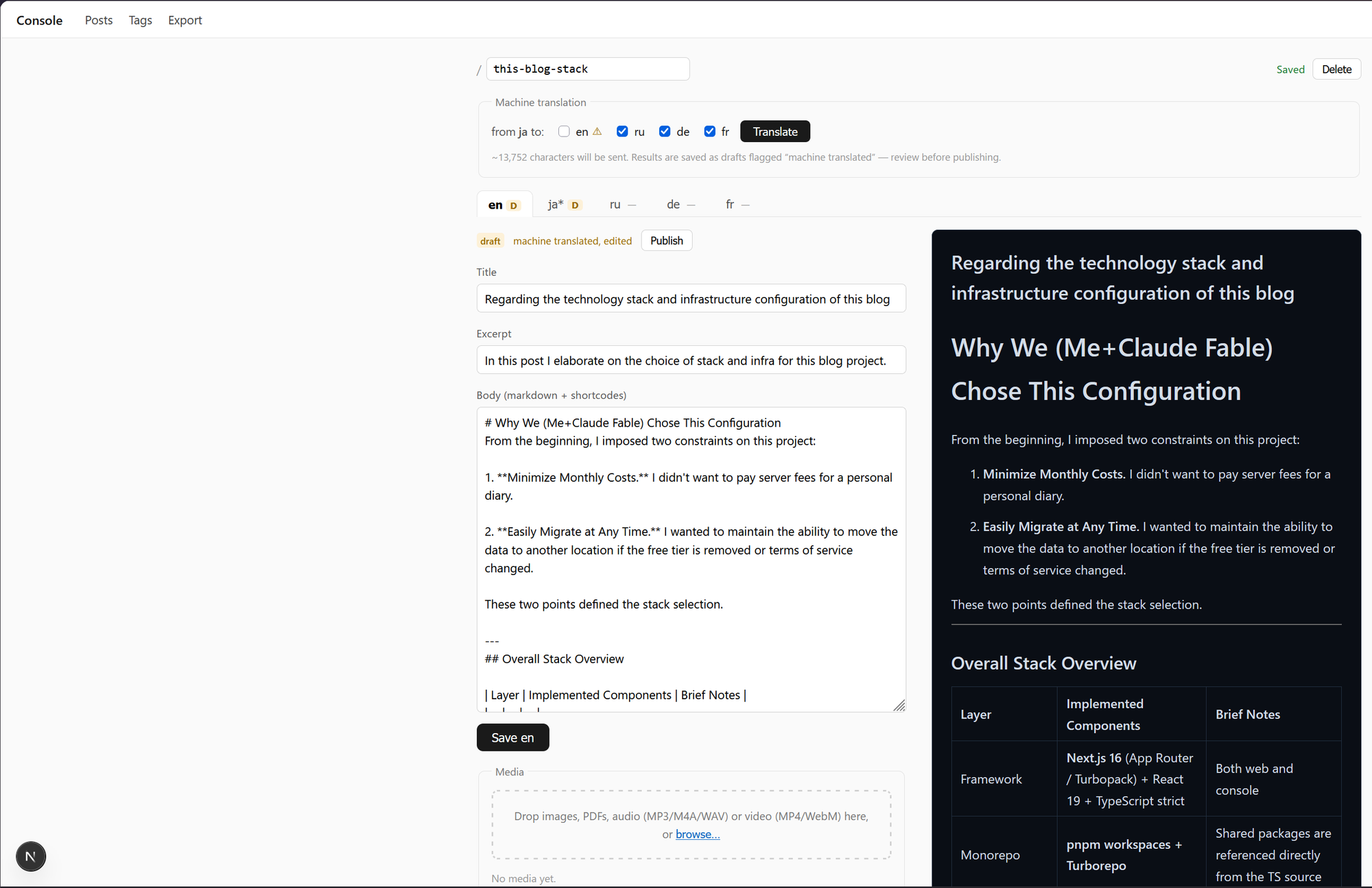
Why "Direct REST Calls" for Google Translate?
We use the Google Cloud Translation API v3 for machine translation. However, we don't use the official gRPC SDK; instead, we directly call the REST endpoint using fetch and only perform service account signing with google-auth-library.
The reason is to reduce dependencies. All that's needed is to "throw in text and receive a translation." Rather than dealing with a heavy SDK, it's lighter to just borrow authentication and run it thinly. This makes the build process lighter and easier to track. For personal use within the free tier (less than 500,000 characters per month), this is sufficient. Before translation, the character count is displayed to help users stay within the free tier.
Why I Don't Use a UI Framework (Plain CSS + CSS Modules)
I don't use Tailwind or MUI. Styling is done with plain CSS using CSS Modules.
For a small personal blog, the learning curve and the resulting heavy CSS of a UI framework are less appealing than writing it myself, which is lighter, clearer, and more enjoyable. I only borrow a headless library (Embla Carousel) for logic-heavy components like the carousel – my policy is to borrow only the behavior, not the appearance.
Incidentally, the "night police station" background on the homepage is also drawn entirely with CSS, not an image. Creating a similar feel without borrowing a single pixel from someone else's pixel art – this too is a product of the "joy of writing with plain CSS."
Overall Infrastructure Diagram
┌────────────── pnpm + Turborepo monorepo ──────────────────┐
│  apps/web(public site)      apps/console(editor console)  │
│         │                          │                      │
│         └──────────┬───────────────┘                      │
│      packages/content(Markdown+short-code rendering)      │
│      packages/db(Drizzle schema/types/locale)             │
└──────────────────────┬────────────────────────────────────┘
                       │
      ┌────────────────┼───────────────────┐
      ▼                ▼                   ▼
  Supabase         Cloudflare R2       Google Cloud
  ・Postgres 17    ・audio/video          ・Translation API v3
  ・Storage        ・presign direct upload/service account auth
  ・Auth(GitHub)   ・egress fees zero
      ▲
      │ weekly pg_dump
  GitHub Actions(cron)